Detangling a Store: The Need to Read in the Age of AI
I currently work with a team building a workflow builder and I recently worked on investigating the effort needed to add multiplayer functionality. The app has nodes and edges as seen in the example below.
This example is taken from a different app, not the one I work on for work.
While prototyping Liveblocks multiplayer, I had to decide what belongs in shared storage. For us, that should’ve been just nodes and edges. But I noticed the store also had nodeData—a second copy of the currently edited node’s data. Understanding why it existed (and whether multiplayer needed it) uncovered a deeper issue in how our store was structured. This post explains what I found and how we refactored it.
To understand the problem, I will start by explaining the current state of the workflow builder store. The store has fields from different slices to track nodes(A node has react flow node data fields and node configuration from our app to define what the node does), edges(An edge has data fields from react flow and our app to define how nodes are connected) and other ui state..
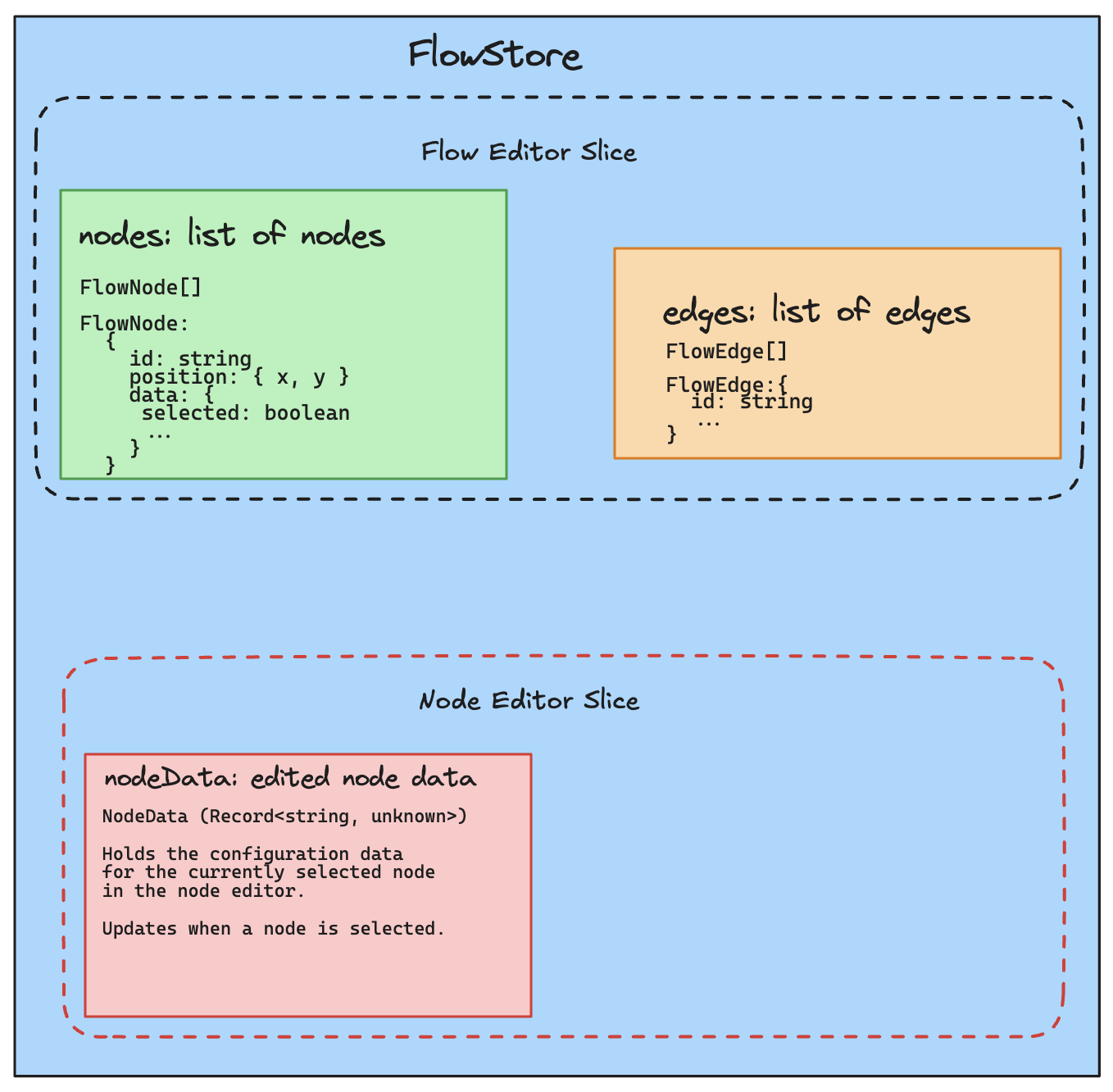
From the diagram we can see that:
- The flow store uses the
nodes[]field to keep track of nodes andedges[]to keep track of edges. - It also has a
nodeDatafield which comes from the nodeEditor slice and keeps the data of the edited node. This brings us to our first problem, for an edited node, we have two copies of its data, the first one in thenodes[]list and the other innodeData.
Why is this a problem?
- When changing data we need to make sure that the two places are in sync.
- When adding a new feature e.g undo/redo you have to update both places accordingly.
- When a user is adding a new feature with less context, they might not know what to use as a source of truth which hurts maintainability.
- We store an extra copy of data in memory.
There are cases where it might be reasonable to have both copies of data e.g if you wanted to process the data before updating it in the
nodes[]list, but on looking more into the codebase, this wasn't the case. And having a single source of truth is a good practice when it comes to state management.
The search for a single source of truth:
Since we don't do any processing, it was obvious that removing nodeData and using nodes[].data as a single source of truth would solve all our problems. But on digging further, that's when I ran into the second problem.
The nodeSlice was overloaded. It was used in the workflow builder when editing a node and on another page when editing some special type of nodes that are called Templated nodes. Unlike the workflow builder, that page needed nodeData always, with a shape that is different from the nodeData in the workflow builder.
This also introduced its set of problems:
- The Templated node page belongs to another team let's call it
Team Tand the workflow builder belongs to another team let's call itTeam Awhich causes inter team dependencies and blurred lines of ownership. - The nodeEditor slice had logic for both the workflow builder and the Templated node editing operations.
- We had logic to detect which editing mode we are in and perform the correct operation. These details leaked into the main store which resulted into a couple of acrobatics in the code.
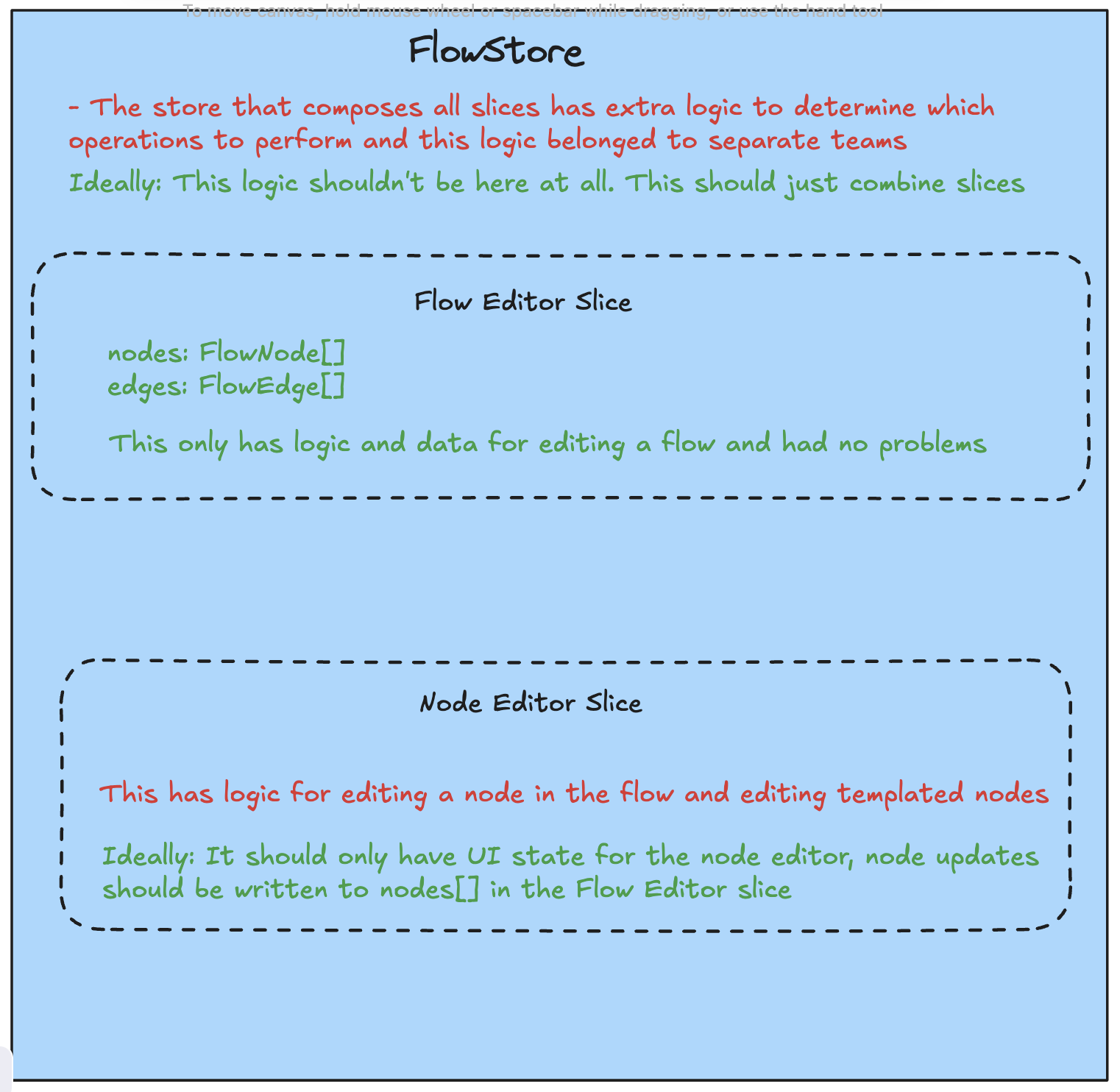
At this point I knew what needs to be done but giving all context to an AI agent and asking it to perform the refactor in one shot wouldn't be enough because of the size of the refactor. Solving it in a phased approach was the way to go and so we broke it into:
- Stop cloning node data for flow editing (use
nodes[].data). - Remove nodeData entirely for flow editing.
- Separate flow node editing and Templated node editing logic.
The first two tasks were straight forward since they were just code changes but separating the editing logic required was both a code and an architectural change as discussed below.
When I asked a coding agent how it could solve that, it suggested a solution to put templated node logic in a separate store, keep node editor logic in the node editor slice and use react context to provide both functionalities to the shared form components
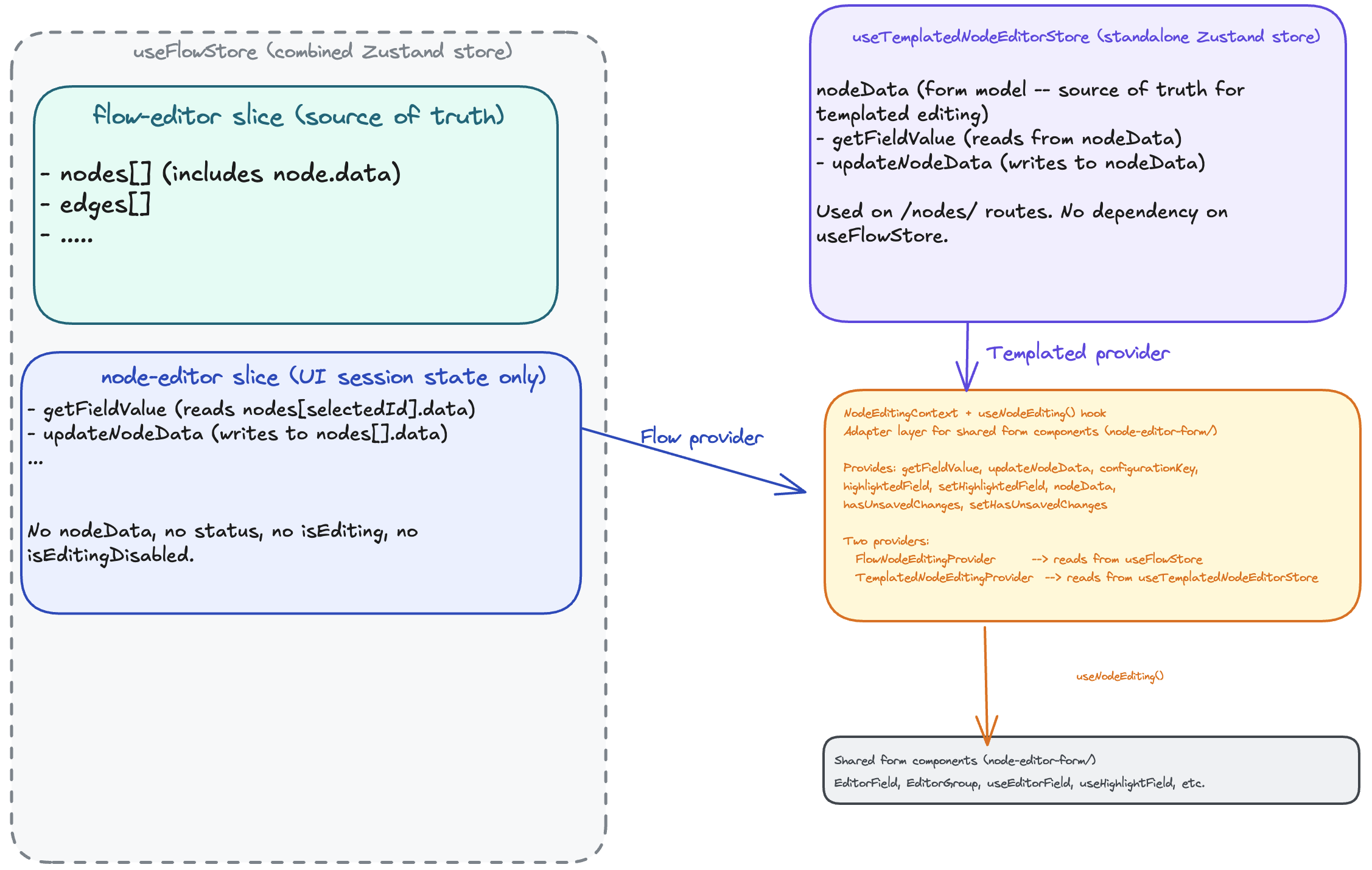
The solution looked great and also unveils another dependency problem between the workflow builder node editor and the Templated node editor. They share some form fields, which means that it's not only the store that needs to be refactored.
Even though the solution looked nice, I thought it could be better in the following ways:
- It introduces react context with two more providers and given we use Zustand, I thought we could solve this problem with Zustand alone without help from react context.
- We would have to refactor the store and the form fields but I thought just resolving the problem at the store level without modifying the input fields should be possible. The UI refactor can be done after this.
- Using react context was going to come with a lot of boilerplate and modification of tests.
This is where pre-existing knowledge about the frameworks and libraries comes in handy when using coding agents. You have to point them in a better direction if one exists, you are the driver.
If I knew nothing about Zustand or React, I would've just approved this solution and asked the agent to implement this. For this reason, reading remains necessary in the age of AI. I think it's important to understand the libraries and frameworks you are using and good practices around them such that you can guide agents when cases like this arise.
After thinking about it, I explained to it what I thought was a better approach, solving this on the store level using a facade and this was its response:
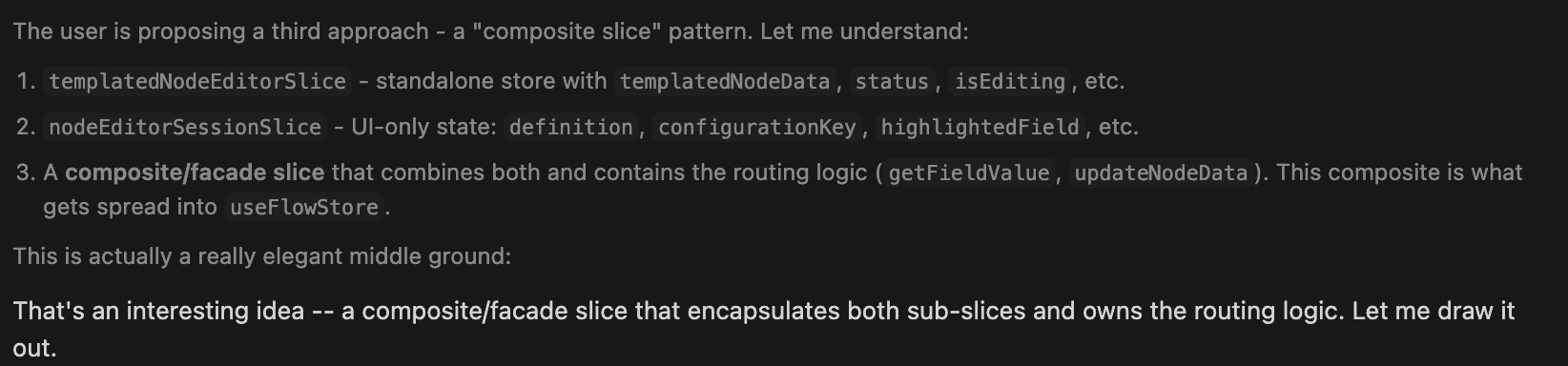
Which brings us to the final solution.
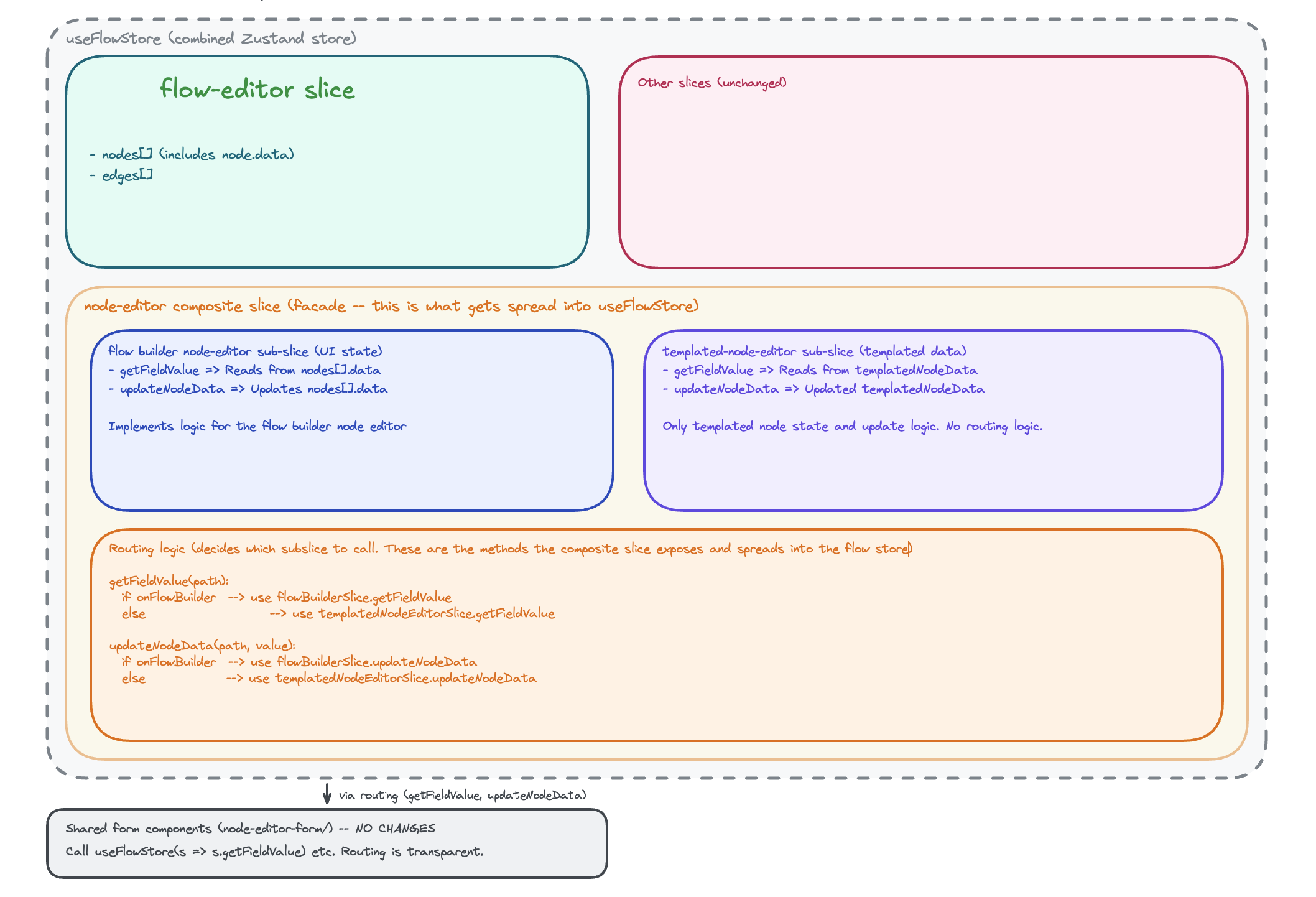
The solution involved:
- Creating two sub slices, one to hold templated node logic and the other to hold logic for editing a node on the workflow builder.
- Create a facade that combines both slices, routes between them and spreads node editing logic to the flow store.
This was superior because:
- The flow store no longer needs to know about types of nodes, but only knows how to edit a node or perform any other operation on a node. The facade handles routing between the node editing types.
- We don't need to edit the shared form fields. We still give them the same methods like getFieldValue but the facade does the routing to call the correct method depending on where the form is rendered.
- Splitting the features in the long run is easy since the templated node editing logic and workflow builder node editing logic are separate. We just have to remove the facade and use the sub slices in their respective places.
After setting the direction and breaking the solution into smaller tasks, it was time to ask the coding agent to do what it does best, power through the code.
At the end of the day we no longer duplicated edited node data, the logic for separate teams now lives in separate files and even if we have a new special type of node editing use case we want to support, we can just add a slice for it without changing the existing workflow builder logic or the shared UI components.
Related Posts (3)
Vibe coding complex features without defining constraints is a recipe for regression - What happens when a complex feature gets vibe coded without a human in the loop?
We needed to solve concurrent editing in our React Flow workflow builder. Here's how Yjs + WebSockets, Yjs + SSE, and Liveblocks compared — and why we chose locks instead.
A tooltip bug where the AI fix “worked” by spreading z-index, but the real fix was keeping portals inside the right stacking context.